> For the complete documentation index, see [llms.txt](https://help.brickspacelab.com/llms.txt). Markdown versions of documentation pages are available by appending `.md` to page URLs; this page is available as [Markdown](https://help.brickspacelab.com/keystone/guides/products/metafields-on-product-cards.md).
# Metafields on product cards
Product cards can show metafields in two different ways in Keystone, depending on **how** products are laid out. Merchants often expect **Theme settings → Product cards → Table details** to drive collection **grid** cards, but that setting only applies to **list and table** (row) layouts—not the grid card layout.
#### Grid cards versus list or table layouts
On collection pages (and anywhere the theme shows many products at once), Keystone renders **grid** product cards separately from **list** or **table** rows:
* **Grid view** uses the standard product card layout. Only metafields that the theme reads in code appear there. You cannot point the grid at an arbitrary comma-separated list of metafields from theme settings.
* **List or table view** uses a row-style layout meant for scanning and comparison. **Table details** in theme settings controls which extra metafields appear in that layout.
If you configure Table details but still browse the collection in **grid** view, you will not see those custom columns on the cards. Switch to the list or table style for that collection (when your section supports it), or use the grid-only options below.
For step-by-step setup of Table details, see [Custom content for tables](/keystone/guides/products/custom-content-for-tables.md).
#### Metafields that show on grid cards (no code)
These are fixed hooks in the theme. Create the matching metafield definitions in **Settings → Custom data → Products** and fill values per product.
| What you want | Metafield | Theme setting |
| --------------------------------------------------------------- | --------------------------------------------------------------------------------------- | ------------------------------------------------------------------------------------------------------------------------------------------------ |
| Short line under the title (tagline) | Namespace and key: `descriptors.subtitle` (Shopify may label this **Product subtitle**) | **Theme settings → Product cards → Enable product tagline** must be on. See [Product subtitles](/keystone/guides/products/product-subtitles.md). |
| Badge on the product image | `custom.badge` (single line text) | Works when your card shows the badge treatment; see [Product badges](/keystone/guides/products/product-badges.md) (metafield method). |
| Custom **Add to cart** (or equivalent) button label on the card | `custom.button_text` | See [Replace "Add to cart"](/keystone/guides/products/replace-add-to-cart.md). |
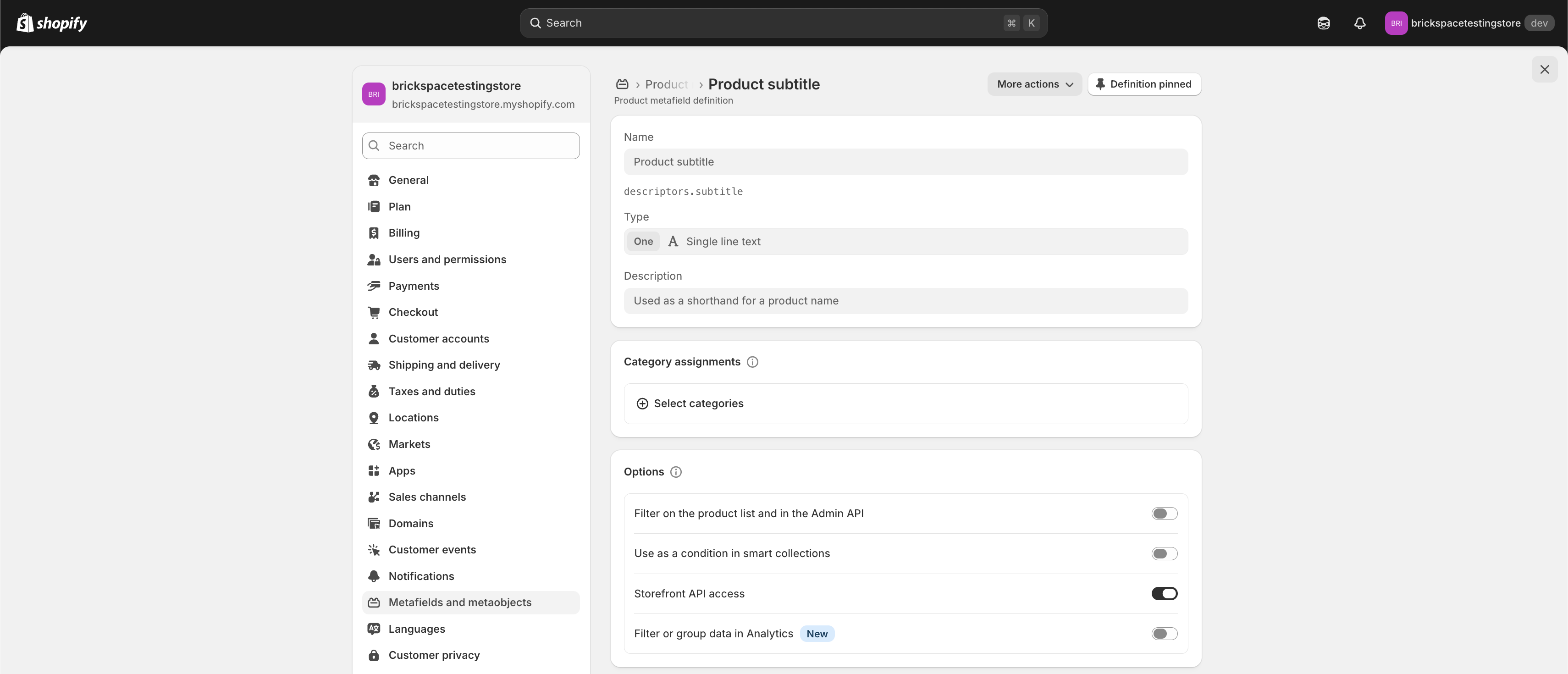 (Screen shot of metafield setup)
#### Showing more information on grid cards
* **Use the tagline for extra copy.** If the **Product subtitle** (`descriptors.subtitle`) definition uses a multi-line or rich text type, you can sometimes combine a few short lines in that one field instead of many separate card fields.
* **Custom Liquid or theme edits.** To output additional metafields on grid cards, the theme’s product card templates must be extended. That is an advanced or developer change; start from [Add custom Liquid](/keystone/advanced-customizations/adding-custom-liquid.md) and treat product card snippets as the place a developer would wire new metafields.
* **Variant rows in the product table.** Structured per-variant values (UPC, compliance text, and similar fields) use the comma-separated **Variant metafields** fields under **Theme settings → Product cards**. See [Show variant data in the product table](/keystone/guides/products/show-variant-data-in-product-tables.md).
---
# Agent Instructions
This documentation is published with GitBook. GitBook is the documentation platform designed so that both humans and AI agents can read, navigate, and reason over technical content effectively. Learn more at gitbook.com.
## Querying This Documentation
If you need additional information that is not directly available in this page, you can query the documentation by asking a question.
Perform an HTTP GET request on the following URL with the `ask` and `goal` query parameters:
```
GET https://help.brickspacelab.com/keystone/guides/products/metafields-on-product-cards.md?ask=&goal=
```
`ask` is the immediate question: it should be specific, self-contained, and written in natural language.
`goal` is what the user is ultimately trying to achieve, the reason they need the answer. Sharing it helps GitBook give you a better, more relevant answer. A goal is most helpful when it describes the outcome the user wants rather than restating the question. For example, with `ask=how do I create an API token`, a goal like `automate deployments from our CI pipeline` lets GitBook tailor the answer to that use case.
The response will contain a direct answer to the question and relevant excerpts and sources from the documentation.
Use this mechanism when the answer is not explicitly present in the current page, you need clarification or additional context, or you want to retrieve related documentation sections.
(Screen shot of metafield setup)
#### Showing more information on grid cards
* **Use the tagline for extra copy.** If the **Product subtitle** (`descriptors.subtitle`) definition uses a multi-line or rich text type, you can sometimes combine a few short lines in that one field instead of many separate card fields.
* **Custom Liquid or theme edits.** To output additional metafields on grid cards, the theme’s product card templates must be extended. That is an advanced or developer change; start from [Add custom Liquid](/keystone/advanced-customizations/adding-custom-liquid.md) and treat product card snippets as the place a developer would wire new metafields.
* **Variant rows in the product table.** Structured per-variant values (UPC, compliance text, and similar fields) use the comma-separated **Variant metafields** fields under **Theme settings → Product cards**. See [Show variant data in the product table](/keystone/guides/products/show-variant-data-in-product-tables.md).
---
# Agent Instructions
This documentation is published with GitBook. GitBook is the documentation platform designed so that both humans and AI agents can read, navigate, and reason over technical content effectively. Learn more at gitbook.com.
## Querying This Documentation
If you need additional information that is not directly available in this page, you can query the documentation by asking a question.
Perform an HTTP GET request on the following URL with the `ask` and `goal` query parameters:
```
GET https://help.brickspacelab.com/keystone/guides/products/metafields-on-product-cards.md?ask=&goal=
```
`ask` is the immediate question: it should be specific, self-contained, and written in natural language.
`goal` is what the user is ultimately trying to achieve, the reason they need the answer. Sharing it helps GitBook give you a better, more relevant answer. A goal is most helpful when it describes the outcome the user wants rather than restating the question. For example, with `ask=how do I create an API token`, a goal like `automate deployments from our CI pipeline` lets GitBook tailor the answer to that use case.
The response will contain a direct answer to the question and relevant excerpts and sources from the documentation.
Use this mechanism when the answer is not explicitly present in the current page, you need clarification or additional context, or you want to retrieve related documentation sections.